
How can we help?
-
Sign Up Your Account
-
Get Started
-
Appointments
-
Reporting & Analytics
-
Patient Management
- Patient Dashboard
- Patient Demographics
- Adding Patient Insurance
- Prior Authorization
- Insurance Eligibility Verification
- Additional Info
- Manage Patient's Contacts
- Flags
- Manage Patient Homework
- Patient Appointments
- Managing Credit Cards
- Documents
- Problems
- Allergies
- Medications
- Immunizations
- Family History
- Past Medical History
- Client Portal Access
- Creating New Patient
- Treatment Plan
- Sending Form to Patient
- Good Faith Estimate
- Patient Care Summary
- Patient care checklist
- Outcome Measures
- Imaging
- Patient Group & Group Appointment
- Assigning Membership plan
- Lifestyle and Diet Recommendation
- Show Remaining Articles (5) Collapse Articles
-
E-prescriptions
-
Lab Orders & Results
-
Task Management
-
Messaging
-
Feedback & Support
-
Insurance Billing
-
Practice Dashboard
-
Appointments Dashboard
-
Provider Availability
-
Appointment Profile
-
Billing Profile
-
Audit Log
-
Patient Payments
-
Patient Statements
-
Patient Ledger
-
Fee Schedule
-
Manual Insurance Payment Posting (EOB)
-
Card Transactions
-
Automatic Insurance Payment Posting (ERA - Electronic Remittance Advice)
-
Patient Flag
-
Note Taking
-
Macro Buttons
-
Patient Education
-
Incoming & Outgoing Fax
-
Referral Management
-
Account Settings
-
Billing & Services
-
Scheduling Settings
-
Administration Settings
-
Clinical Notes
-
Add-Ons
-
Explore Vozo
-
Patient Portal
-
Calendar Dashboard
-
Patient List
-
Integrations
-
Account cancellation
-
Dashboard
-
Batch eligibility
-
Patient Superbill
-
Membership Plan
-
Diet Recommendation Library
Home >
Patient Care Summary
Views19
View Important Patient Information in One Place
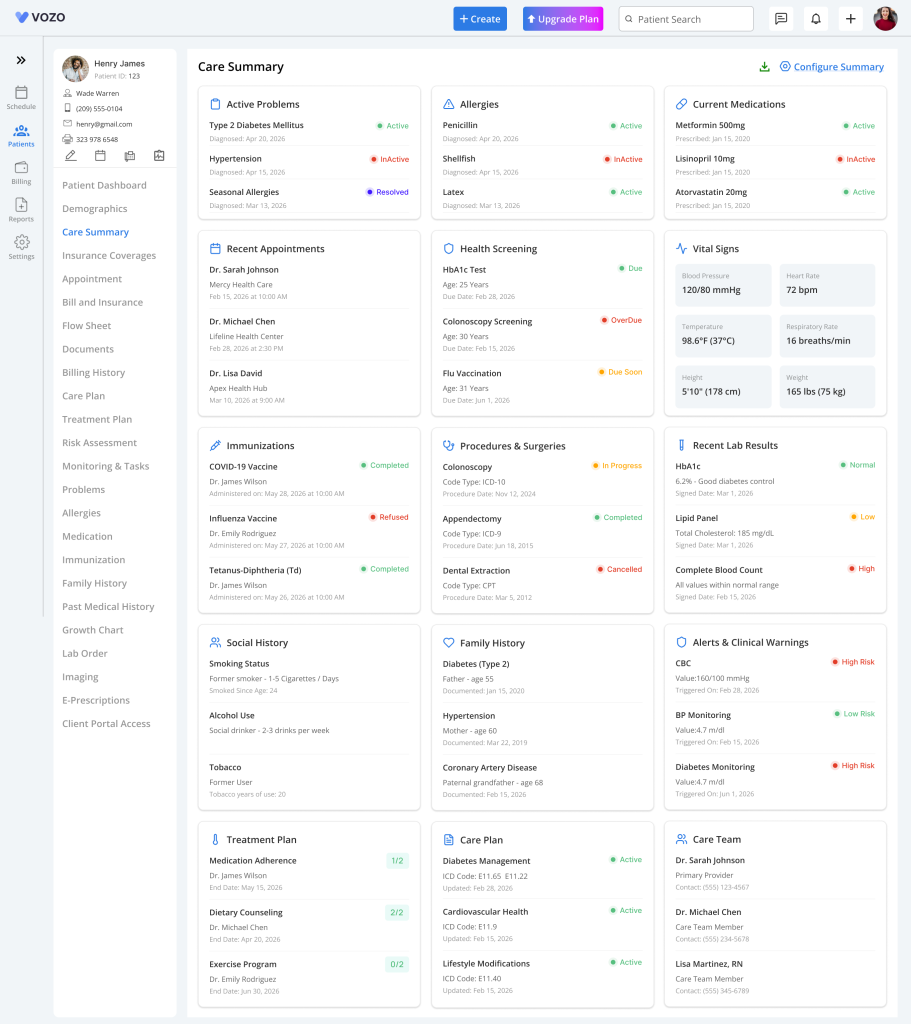
The Patient Care Summary feature gives providers a quick overview of patient medical and clinical information from a single page inside the Patient Dashboard. This helps providers review important patient details faster and download a complete patient summary whenever needed.
Access Patient Care Summary
- Open Patient Dashboard
- Select Care Summary
- The Care Summary page opens.
Purpose of Care Summary
Care Summary helps users:
- View important patient information quickly
- Review clinical details from one page
- Configure which summary sections should appear
- Download complete patient summary as PDF
- Improve access to patient records
Care Summary Page Overview
- The page displays patient information in card view. Each section appears as an individual card.
- The Care Summary page can display:
- Active Problems
- Allergies
- Current Medications
- Recent Appointments
- Health Screening
- Vital Signs
- Immunizations
- Procedures & Surgeries
- Recent Lab Results
- Social History
- Family History
- Alerts & Clinical Warnings
- Treatment Plan
- Care Plan
- Care Team
Configure Summary
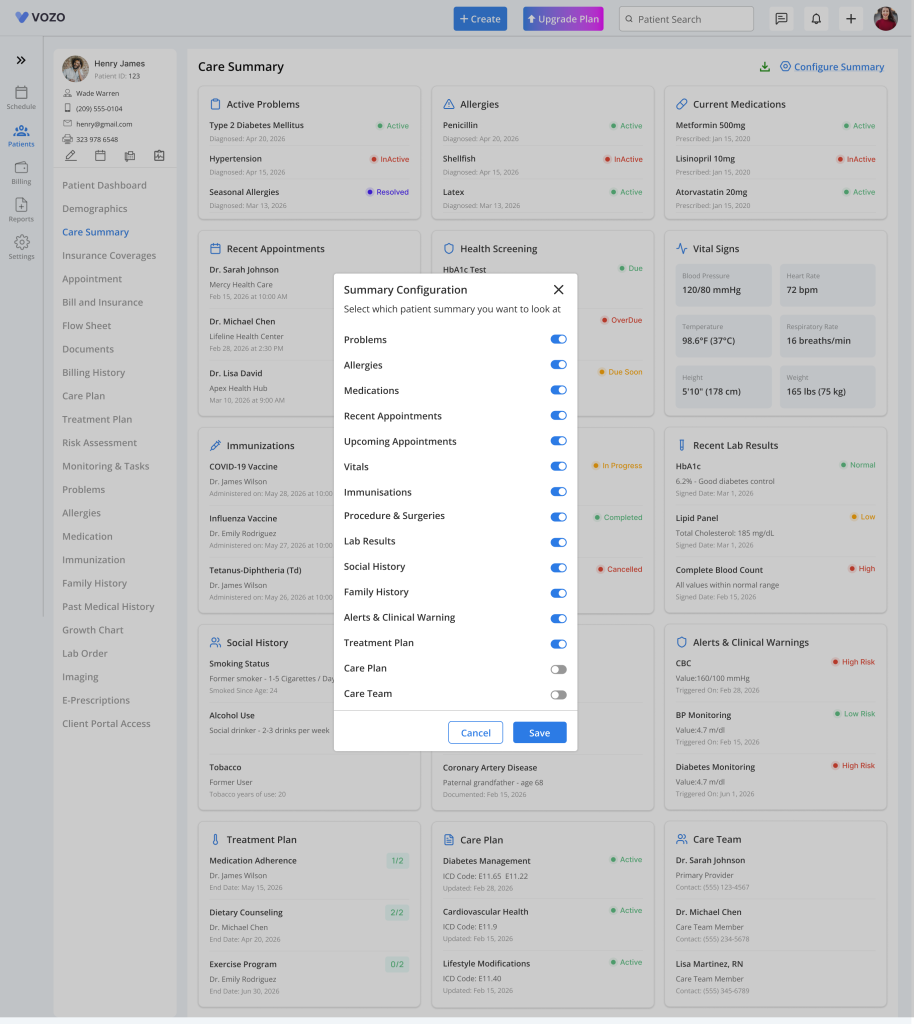
- Providers can choose which cards to display by configuring the summary options
- To configure, click: Configure Summary, a pop-up opens displaying available summary toggle options:
- Problems
- Allergies
- Medications
- Recent Appointments
- Upcoming Appointments
- Vitals
- Immunizations
- Procedures & Surgeries
- Lab Results
- Social History
- Family History
- Alerts & Clinical Warnings
- Treatment Plan
- Care Plan
- Care Team
Toggle Options
Enabled
When enabled, the summary card appears on the page
Disabled
When disabled: The summary card is hidden
Download Patient Care Summary PDF
Click: Download PDF, system generates: Patient Care Summary PDF
Table of Contents