
How can we help?
-
Sign Up Your Account
-
Get Started
-
Appointments
-
Reporting & Analytics
-
Patient Management
- Patient Dashboard
- Patient Demographics
- Adding Patient Insurance
- Prior Authorization
- Insurance Eligibility Verification
- Additional Info
- Manage Patient's Contacts
- Flags
- Manage Patient Homework
- Patient Appointments
- Managing Credit Cards
- Documents
- Problems
- Allergies
- Medications
- Immunizations
- Family History
- Past Medical History
- Client Portal Access
- Creating New Patient
- Treatment Plan
- Sending Form to Patient
- Good Faith Estimate
- Patient Care Summary
- Patient care checklist
- Outcome Measures
- Imaging
- Patient Group & Group Appointment
- Assigning Membership plan
- Lifestyle and Diet Recommendation
- Show Remaining Articles (5) Collapse Articles
-
E-prescriptions
-
Lab Orders & Results
-
Task Management
-
Messaging
-
Feedback & Support
-
Insurance Billing
-
Practice Dashboard
-
Appointments Dashboard
-
Provider Availability
-
Appointment Profile
-
Billing Profile
-
Audit Log
-
Patient Payments
-
Patient Statements
-
Patient Ledger
-
Fee Schedule
-
Manual Insurance Payment Posting (EOB)
-
Card Transactions
-
Automatic Insurance Payment Posting (ERA - Electronic Remittance Advice)
-
Patient Flag
-
Note Taking
-
Macro Buttons
-
Patient Education
-
Incoming & Outgoing Fax
-
Referral Management
-
Account Settings
-
Billing & Services
-
Scheduling Settings
-
Administration Settings
-
Clinical Notes
-
Add-Ons
-
Explore Vozo
-
Patient Portal
-
Calendar Dashboard
-
Patient List
-
Integrations
-
Account cancellation
-
Dashboard
-
Batch eligibility
-
Patient Superbill
-
Membership Plan
-
Diet Recommendation Library
Home >
Diet Recommendation Library
Views8
Access the Diet Recommendation Library
- The Global Diet Recommendation Library is a centralized location where providers can manage reusable diet plans.
- Navigate to the Diet Recommendation menu to access the library.
- From this page, providers can create, edit, delete, and assign diet recommendations to patients.
Create a New Diet Plan
- Click Add Diet Recommendation and enter the recommendation details.
- Provide the following information:
- Title
- Description
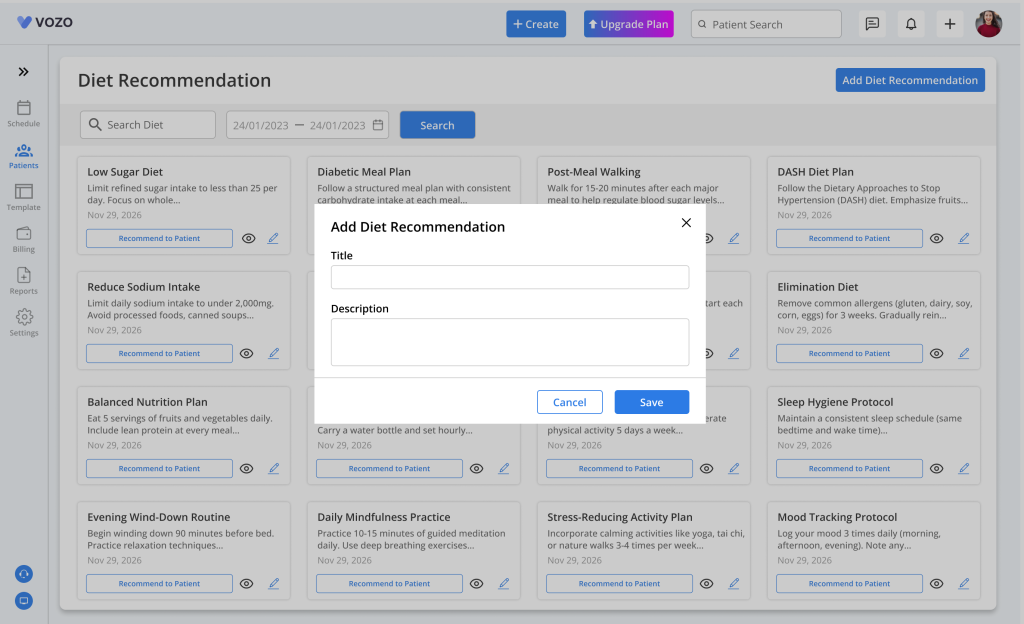
- After clicking Save, the recommendation becomes part of the global library and can be assigned to any patient in the future.
Manage Diet Recommendations
- Each recommendation in the library is displayed as a card containing the recommendation title and description.
- Available actions include:
- Recommend to Patient
- Edit
- Delete (not default)
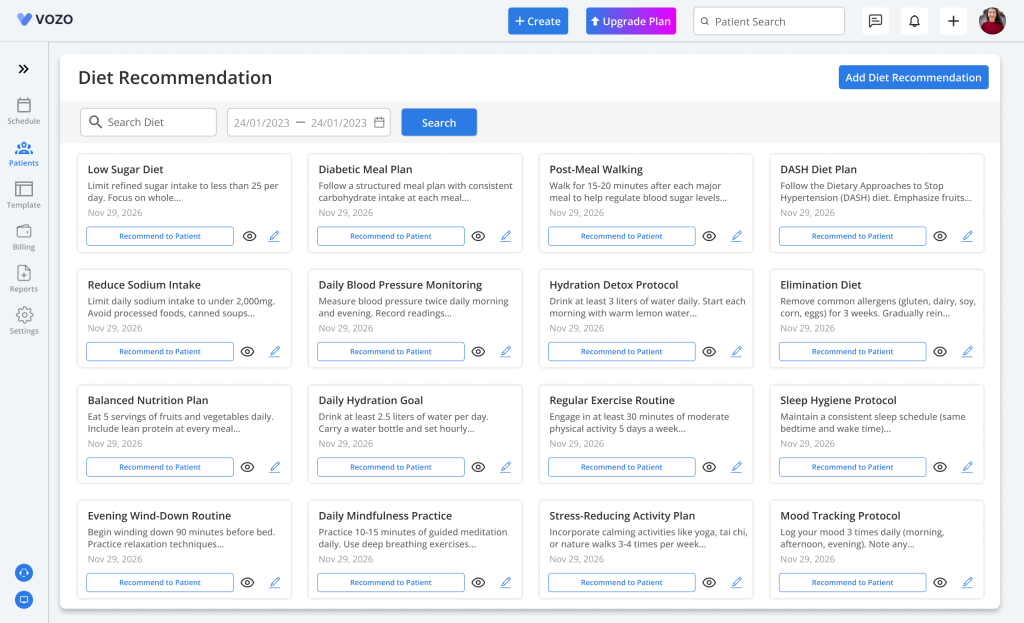
- Providers can update existing recommendations or assign them directly to patients without creating a new recommendation each time.
Assign a Recommendation from the Global Library
- To assign an existing recommendation, click Recommend to Patient on the desired recommendation card.
- Select one or more patients and click Assign.
- The selected recommendation is immediately linked to the patient and becomes visible in the Lifestyle & Diet section of the Patient Portal.
Table of Contents